Overview
Not sure how to answer the question: "Which of my Pokémon would be best in this battle?" This advanced matchup tool helps you identify the best choice by analyzing your Pokémon’s types, moves, stats, levels, and more. Instead of relying only on type advantages, you’ll see which Pokémon on your team truly has the best chance to win. Make smarter switches, pick stronger counters, and step into every battle with confidence as you grow into a legendary Pokémon trainer.
*Stats are generated approximately when level is modified. Enter your Pokémon's exact stats to produce more precise results.
Results
|
Opponents Pokémon |
Best Against (The Pokémon from your team with the highest probability of winning the battle matchup) |
||
|---|---|---|---|
| 1st | 2nd | 3rd | |
Click the CALCULATE button above to generate results
| Win Probability | |||||
|---|---|---|---|---|---|
| Extremely Likely | Very Likely | Likely | Unlikely | Very Unlikely | Extremely Unlikely |
| ★★★★★ | ★★★★ | ★★★ | ★★ | ★ | (no stars) |
| Win Probability | |
|---|---|
| Extremely Likely | ★★★★★ |
| Very Likely | ★★★★ |
| Likely | ★★★ |
| Unlikely | ★★ |
| Very Unlikely | ★ |
| Extremely Unlikely | (no stars) |
What the Analyzer Does and Why It’s Useful
This matchup tool analyzes your entire Pokémon team and compares it against an opponent’s Pokémon to identify which of your options gives you the strongest advantage. Instead of relying on guesswork or trying to memorize dozens of type interactions, the tool evaluates multiple factors at once—type effectiveness, move coverage, stat profiles, and level differences—to surface the teammate most likely to win the encounter. This turns a complicated decision into a clear, data‑driven recommendation you can trust.
It’s especially useful because real battles rarely come down to type matchups alone. A Pokémon with a disadvantageous type can still win with the right moves, stats advantage, or item, and those details are easy to overlook in the moment. By weighing all of these elements together, the tool helps you avoid common mistakes, choose smarter counters, and play more confidently—whether you’re progressing through the story, building competitive teams, or preparing for tough trainer battles.
Players who take on challenge runs like Nuzlockes, permadeath rulesets, or “lose once and the run is over” styles benefit from this tool because it reduces uncertainty and helps make safer, more informed decisions. These formats punish even small mistakes, so having a way to evaluate matchups before committing to a battle can dramatically improve survival odds.
How to Use This Tool
These steps walk you through the basic flow of using the matchup tool. Each step expands on how to use the tool with detailed explanations, screenshots, or examples.
-
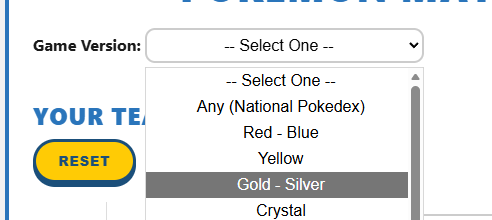
Select your game version.
In each video game version of Pokémon, there are differences in the Pokémon and their data. Selecting the specific game version you are playing enables our tool identify the correct data to use in its calculations. To select a game version, click on the drop-down next to Game Version: at the top of the Matchup Analyzer. Then select the appropriate version. After a game version has been selected, the Pokémon Species: search boxes will no longer be disabled.
-
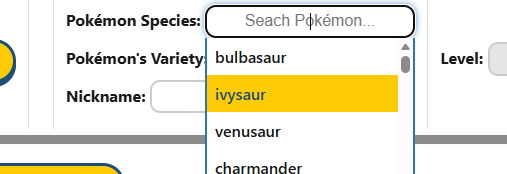
Select your Pokémon species.
In the search box next to Pokémon Species: find your Pokémon species. Click into the box and begin typing to search for a specific Pokémon. Or click into the search box and scroll through the list of Pokémon that will appear underneath the search box. The Pokémon are in the same order as they appear in the choosen game version's Pokédex. After a Pokémon species has been selected and if our system identifies varieties for the choosen Pokémon species, the Pokémon Variety: box will no longer be disabled. If there are no varieties detected, then the Pokémon Variety: box will remain disabled with the "N/A" (not applicable) value. And all other Pokémon information boxes for that Pokémon will no longer be disabled.
-
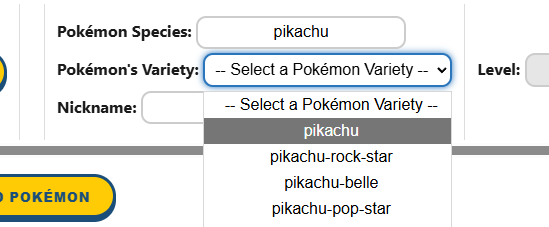
Select your Pokémon variety.
If your Pokémon species has varieties, select a variety from the drop-down list next to Pokémon Variety: just under the Pokémon Species: search box. Otherwise, skip this step. After a Pokémon variety has been selected, all other Pokémon information boxes for that Pokémon will no longer be disabled.
-
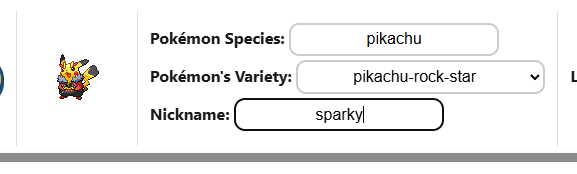
Enter a nickname (optional).
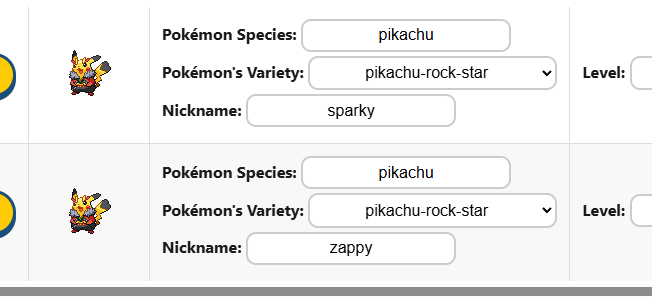
Occasionally, trainers will have more than one of same Pokémon on their team. There is no way to differenciate between the same Pokémon in the results table unless a unique nickname is given to each Pokémon. Select the text box next to Nickname: and enter your Pokémon's nickname.
-
Enter your Pokémon's information.
Following the same technique as used in the last steps, enter your Pokémon's level, moves, stats, and item. Please note: Level is restricted to be a positive whole number and the stats will change with automatically generated data each time the level is modified.
-
Repeat steps 2-5.
For each Pokémon in your team and each Pokémon on your opponents team, repeat steps 2-5. Your Pokémon should be added to Your Team of Pokémon.
Your opponents Pokémon should be added to Opponents Team of Pokémon.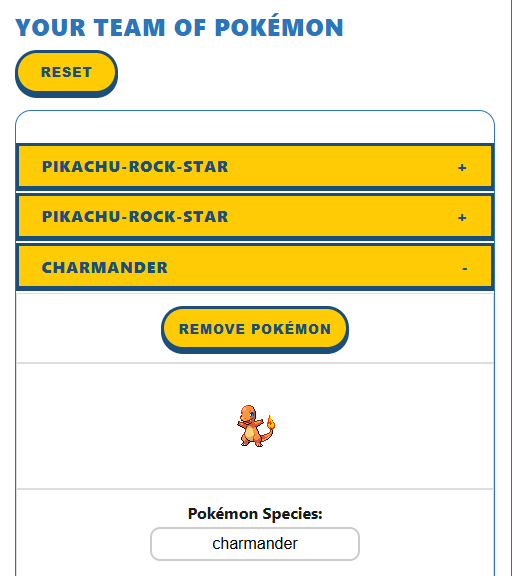 To add additional Pokémon to either team, click the Add Pokémon button below the respecitve team. To remove a Pokémon entry, click the X button to the left of the Pokémon. Or click the Remove Pokémon button above the Pokémon for mobile devices. Please note: At least one Pokémon entry must be in each team.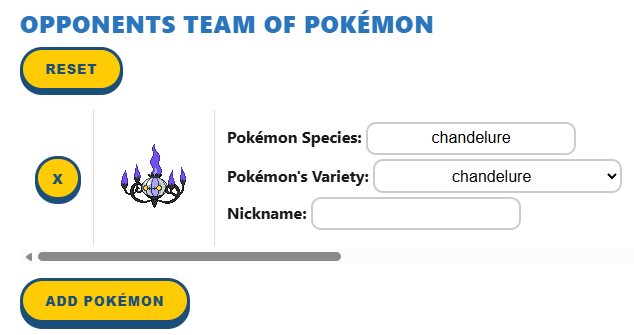
-
Calculate to see the analysis.
Please note: Pokémon Species, Pokémon Variety (when applicable), and Move 1 fields are required for all Pokémon in order to genernate results. Review all Pokémon data provided, then click the CALCULATE button. The screen will automatically move down so that the results are in view. Processing all possible matchups may take a few minutes.

-
Review the matchup results.
The matchup analysis results can be found in the table directly underneath the Results header. Each of the opponents Pokémon will be displayed in the left most column under Opponents Pokémon.
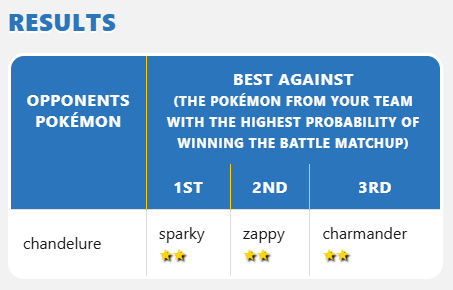
For each opponent Pokémon, each Pokémon in your team will be ranked left to right (best to worst) in the Best Against column by the probability that each individual Pokémon will win in that given matchup.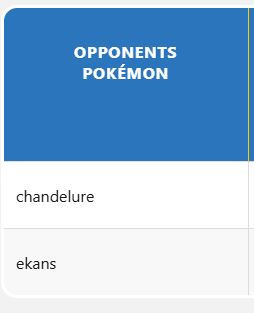 For exmaple: When looking at image below. The table row with "chandelure" has "charmander" ranked 3rd.
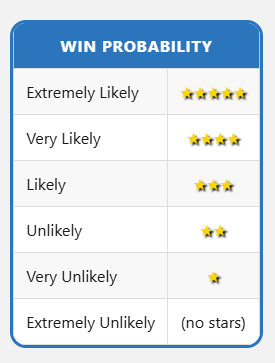
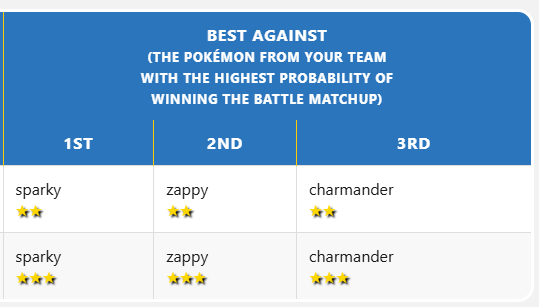 This means that "charmander" is the 3rd most likely Pokémon to win in a matchup against "chandelure" out of your team of Pokémon. In this example, "charmander" has 2 stars. Comparing that to the Win Probability legend, this means that "charmander" has an unlikely chance of winning the battle against "chandelure".
Usage Examples
Ranking Your Team to Identify Your Strongest Options
When a player wants to understand the overall strength of their team, the analyzer can rank each Pokémon based on how well they perform against a specific opponent or an entire set of upcoming battles. This helps highlight which team members are reliable powerhouses, which ones fill niche roles, and which ones may need move updates or replacements. Seeing your team ordered from strongest to weakest for a given matchup makes planning safer and more strategic.
Utilizing Win Probability for Each Pokémon
When a player wants to understand how likely each team member is to win a specific matchup, the analyzer provides a clear win probability percentage for every Pokémon on the team. This makes it easy to compare options at a glance. Players can quickly see which Pokémon has the highest chance of winning, which ones are risky but possible, and which ones should be avoided entirely. Using these probabilities helps guide safer decisions, especially in high‑stakes battles where choosing the wrong Pokémon could cost the entire run.
Strategy Insights
Why This Tool Is Great for Nuzlockes and Other Challenge Runs
-
Risk management becomes essential. In Nuzlockes and similar modes, losing a single Pokémon—or
losing a single battle—can end an entire run. A matchup analyzer helps identify the safest switch‑ins and reduces
the chance of being surprised by an unexpected weakness or coverage move.
-
Every encounter carries weight. Wild battles, trainer fights, and boss encounters all become
high‑stakes moments. Seeing which team member has the strongest statistical and type advantage helps players avoid
unnecessary risks.
-
Coverage moves are harder to predict under pressure. Many challenge runs end because a player
forgets a common coverage option or misjudges a type interaction. A tool that evaluates multiple factors at once
gives players a clearer picture of what they’re walking into.
-
Team preservation becomes a strategy. Instead of simply winning a fight, players need to win
while keeping their team healthy and intact. Knowing the safest matchup helps preserve key Pokémon for later gyms,
rival battles, or late‑game threats.
-
It supports planning, not just reacting. Challenge runners often plan several battles ahead. A
matchup tool helps map out which Pokémon should handle which encounters, reducing the chance of being forced into
a bad situation later.
Situations Where the Analyzer Becomes Valuable
-
Choosing the Safest Switch‑In During a Tough Trainer Battle.
When facing trainers, the analyzer helps identify which team member has the
strongest defensive typing, stats advantage, and win probability. This reduces the chance of losing a key Pokémon
to an attack.
-
Planning Ahead for a Gym Leader or Boss Fight.
Before entering a gym, players can input each of the leader’s Pokémon to see which team members match up best.
This supports safer planning and prevents sending the wrong Pokémon into a dangerous matchup.
-
Evaluating Wild Encounters During a Nuzlocke.
When encountering a wild Pokémon, the analyzer shows which team member can weaken it safely without risking a
knockout from an unexpected super‑effective move.
-
Deciding Whether to Switch or Stay In.
During battle, the tool helps determine whether the current Pokémon can safely tank the next hit or if switching
is the safer option, reducing the chance of a miscalculated KO. By modifying the HP stat, the results will display
the win probability of that Pokémon's current HP to help determine if they can still win the battle.
-
Mapping Out a Route With Dangerous Trainers.
On routes filled with varied opponents, players can check matchups for each known trainer Pokémon. This helps
preserve health and resources while avoiding unnecessary risks.
-
Checking Coverage Gaps in a Team.
When building or refining a team, players can test matchups against common threats to identify weaknesses and
adjust their lineup before entering major battles.
FAQ
In the Game Version: drop-down, select Any (National Pokedex). This enables selection from a list of any Pokémon from the main game series.
The tool is designed to work for most mainline games. Some mechanics may vary slightly between generations. See the Game Version: drop-down for a list of all featured game versions.
The analyzer is intended to be used in a specific order to enable some fields to populate with the correct data. See How to Use This Tool for the proper use order. As the first fields are filled out, other fields will no longer be disabled.
Win probability is an estimation of how likely a Pokémon is to win a matchup between only itself and the opposing Pokémon. This is based on typing, stats, moves, items, and other factors.
Occasionally the database used to display moves does not return any moves for certain Pokémon species. This will cause --None-- to be the only move displayed when clicking into a move search box. Simply begin typing to search for specific moves from a list of all possible Pokémon moves.
Pokémon Species, Pokémon Variety (when applicable), and Move 1 fields are required for all Pokémon in order to genernate results.
Not at all. The tool is designed for casual players, beginners, challenge runners, and anyone who wants clearer matchup guidance. No in depth knowledge on Pokémon mechanics is required.
If there is a Pokémon on your team that should obviously be ranked higher and have a higher win probability (For example: Pokémon with a clear level, stats, or type advantage), we recommend doing the following:
- Check each move. For Pokémon that only have status effecting moves, our analyzer will not rank them highly because it is not yet designed to handle only status type moves. Please note that we will be working on this functionality soon and that the ranking and win probability for these Pokémon will be inaccurate until then.
- Try the battle matchup! Sometimes Pokémon can win matchups that seem unlikely or lose ones that seem easy. Put our analysis to the test and see how they do!
- Contact Us. Fill out the form on the Contact Us page. Let us know which Pokémon matchup is not correct and we will fix the issue as soon as we can.
Each time the calculate button is clicked and results are successfully generated, the Pokémon data will be saved. Each game version will save it's own data so you can safely move from version to version analyzing matchups without losing all your inputs. Data is saved in your browsers local storage. Once that storage is full or cleared, data will be lost and will need to be reentered.